Recap of Bytes, Encoding and Decoding
Recap message encoding/decoding.
When we send an interchain message, we are just sending a single value of type bytes. This value can contain multiple values of various types (e.g. string, uint & address) using encoding and decoding.
In this section we will recap these topics:
- Bytes: What is this data type and why are we using it?
- Encoding: How do we turn values into bytes?
- Decoding: How can we turn the bytes back into the values?
We will use these concepts a lot going forward for our messages we send, so make sure you read this carefully.
Bytes
In Solidity, the bytes data type serves as a versatile container for encoding multiple values of different types into a single unified value. You can think of it as a flexible box that can hold various forms of data, such as integers, text, images, or any binary information. The bytes data type allows you to mix and match these different types of data and put them all in one box.
This makes it a pragmatic choice for encapsulating diverse data and data type ensures that all the data is efficiently packaged into a single unit for transfer, and recipients can decode and extract the individual components as needed.
Encoding & Decoding
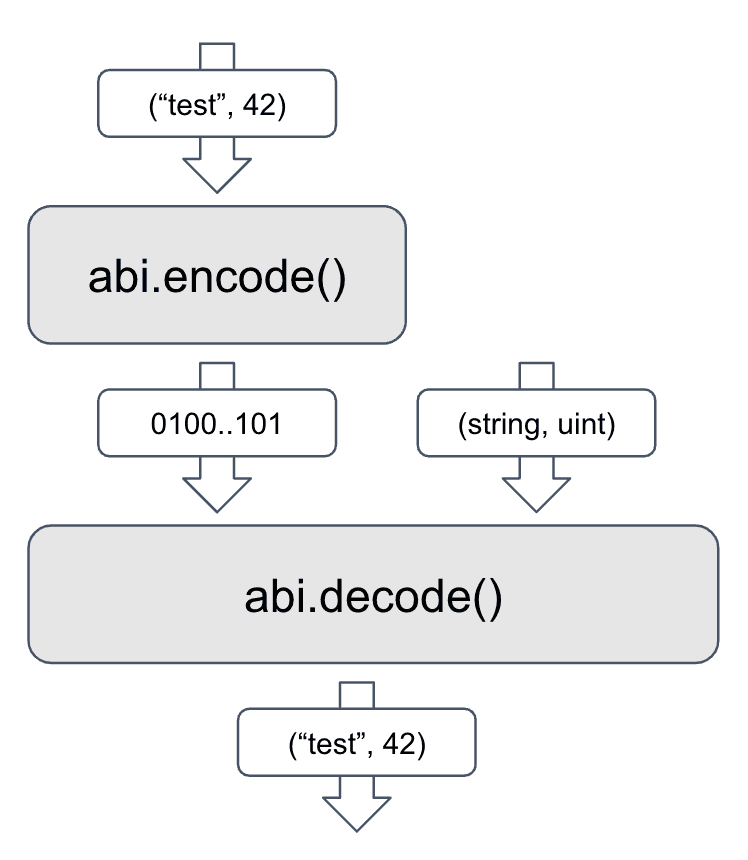
In Solidity we can use the functions abi.encode() and abi.decode() for encoding and decoding. These are part of the solidity language, so we do not need to import anything to use them.
Encoding
When we encode data, we convert it into a byte array. This is useful when we want to send data from one contract to another. We can encode multiple values into a single byte array, which can then be decoded by the receiving contract.
string memory someString = "test";
uint someNumber = 42;

bytes memory message = abi.encode(someString, someNumber);
This single value message here we can now use as a message for Teleporter.
Decoding
When we decode data, we convert it from a byte array back into its original form. This is useful when we receive data from another contract. We can decode the byte array into its original values.
(
  string memory someString,
  uint someNumber
) = abi.decode(message, (string, uint));
This will give us back the original values that we encoded before. Note that we do need to know the types of the values and their order that we encoded to decode them correctly.
Routing by Action: Double Encoding
A receiving contract gets one single bytes value, but it often needs to do different things depending on the message. For example, a bridge may receive a "register" message, a "send tokens" message or a "multi-hop" message, and each one carries different parameters.
The common pattern is to encode the message twice:
- Inner encoding: the parameters of the action, encoded into
bytes. - Outer encoding: an enum that identifies the action, together with the inner
bytes, encoded into a singlebytesvalue.
The receiver decodes in the same order. First it decodes the outer layer to learn the action, then it uses the action to know which types to use for the inner layer. The action tells the receiver which parameters follow.
Sending
enum Action {
    SetGreeting,
    SetNumber
}

function sendSetGreeting(string memory greeting) external {
    // 1. Inner encoding: the parameters of this action
    bytes memory params = abi.encode(greeting);

    // 2. Outer encoding: the action plus its (already encoded) parameters
    bytes memory message = abi.encode(Action.SetGreeting, params);

    // Pass `message` as the `message` field of TeleporterMessageInput
}

function sendSetNumber(uint256 number, address account) external {
    bytes memory params = abi.encode(number, account);
    bytes memory message = abi.encode(Action.SetNumber, params);
}
Both calls produce a value of type bytes, but the content of params is different for each action.
Receiving
function receiveTeleporterMessage(
    bytes32 originChainID,
    address originSenderAddress,
    bytes calldata message
) external {
    if (msg.sender != address(teleporterMessenger)) {
        revert Unauthorized();
    }

    // 1. Outer decoding: which action is it, and what are its raw parameters?
    (Action action, bytes memory params) = abi.decode(message, (Action, bytes));

    // 2. Inner decoding: the action decides which types we use
    if (action == Action.SetGreeting) {
        string memory greeting = abi.decode(params, (string));
        _setGreeting(greeting);
    } else if (action == Action.SetNumber) {
        (uint256 number, address account) = abi.decode(params, (uint256, address));
        _setNumber(number, account);
    }
}
If the sender and the receiver do not agree on the enum values and on the types of each action, the decoding reverts or returns wrong data. Keep the enum and the parameter types in a shared file that both contracts import.
Example: Interchain Token Transfer (ICTT)
The token bridges of Avalanche use this exact pattern. In ITokenTransferrer.sol the action is the enum TransferrerMessageType, and the two layers are wrapped in a struct:
enum TransferrerMessageType {
    REGISTER_REMOTE,
    SINGLE_HOP_SEND,
    SINGLE_HOP_CALL,
    MULTI_HOP_SEND,
    MULTI_HOP_CALL
}

struct TransferrerMessage {
    TransferrerMessageType messageType;
    bytes payload;
}

struct SingleHopSendMessage {
    address recipient;
    uint256 amount;
}
When a TokenRemote sends tokens back to its TokenHome, it builds the inner payload and wraps it:
TransferrerMessage memory message = TransferrerMessage({
    messageType: TransferrerMessageType.SINGLE_HOP_SEND,
    payload: abi.encode(SingleHopSendMessage({recipient: input.recipient, amount: amount}))
});
// The Teleporter message field is then abi.encode(message)
On the receiving side, TokenHome decodes the outer struct, reads messageType, and decodes payload with the matching struct:
TransferrerMessage memory transferrerMessage = abi.decode(message, (TransferrerMessage));

if (transferrerMessage.messageType == TransferrerMessageType.SINGLE_HOP_SEND) {
    SingleHopSendMessage memory payload =
        abi.decode(transferrerMessage.payload, (SingleHopSendMessage));
    // ... release the tokens to payload.recipient
}
Each action has its own struct for the parameters (RegisterRemoteMessage, SingleHopSendMessage, MultiHopCallMessage and so on), but all of them travel through the same Teleporter message field.
Is this guide helpful?